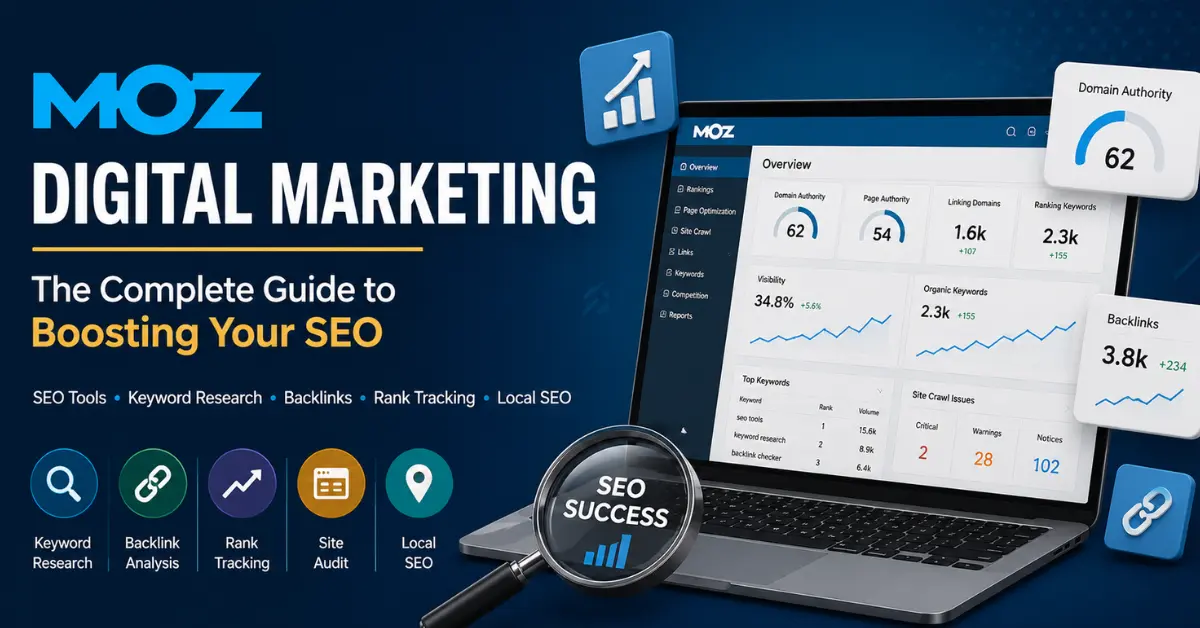
Looking to boost your organic traffic using Moz SEO? Understanding Moz digital marketing tools is the secret to finding high-value keywords, fixing site errors, and outranking your competitors on Google.
Moz digital marketing tools have helped over 500,000 businesses worldwide get found on Google — and in this guide, you will find out exactly how they can do the same for you. Whether you are a complete beginner or someone who has tried SEO before without results, this guide breaks everything down in plain English.
You will get a complete, honest breakdown of Moz digital marketing — what it does, which tools it offers, how to use it step by step, how it compares to competitors, and whether it is worth your money. No fluff. Just clear, actionable information that helps you rank.
What Is Moz? A Simple Definition for Digital Marketers
Moz is an all-in-one Moz SEO software platform that helps businesses, marketers, and agencies improve their visibility on search engines like Google. It gives you the data and tools to find the right keywords, analyze backlinks, fix website issues, and track your search rankings — all from one place.
Think of Moz as your personal SEO assistant. It tells you what is working, what is broken, and exactly what to do next to rank higher.
Quick fact: Moz serves over 500,000 users worldwide and has been trusted by digital marketers for more than 20 years.
A Brief History of Moz: From Blog to Industry Leader
Understanding where Moz came from helps you appreciate why it is trusted in the SEO community.
- 2004 — Rand Fishkin and Gillian Muessig founded the company as SEOmoz, originally a blog where SEO experts shared research and ideas.
- 2007–2008 — SEOmoz shifted from a consulting firm to a SaaS (Software as a Service) company, building tools for search visibility.
- 2013 — The company rebranded as simply Moz, reflecting its broader digital marketing mission.
- 2021 — Moz was acquired by iContact, a digital marketing company, bringing Moz under a larger marketing technology umbrella while keeping its tools and brand intact.
This long history means Moz’s data, metrics, and community are deeply rooted in real SEO experience — not guesswork.
Why Moz SEO Matters for Your Digital Marketing Strategy
SEO is the backbone of any successful digital marketing strategy. When your pages rank higher on Google, you get more organic traffic — and organic traffic converts better than paid ads for most businesses.
Here is why Moz specifically helps:
- It replaces the guesswork in keyword research with real search volume data.
- It shows you exactly which backlinks point to your site (and your competitors’).
- It alerts you to technical issues on your website that hurt rankings.
- It tracks whether your SEO efforts are actually moving the needle.
- It helps local businesses appear in local search results and Google Maps.
Without a tool like Moz, you are essentially doing SEO blindfolded.
Top Moz SEO Tools Explained: Pro, MozBar & Local
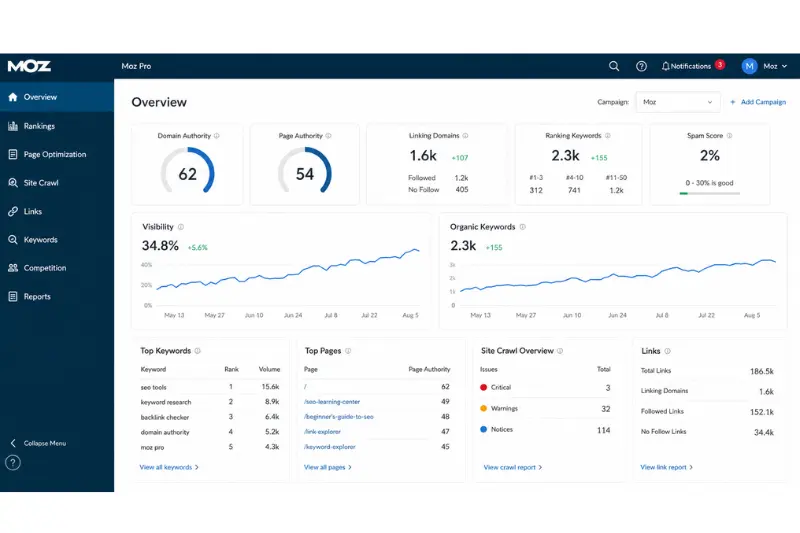
Before diving into the tools, you need to understand Moz’s core metrics. These numbers appear across nearly every Moz feature.
Domain Authority (DA)
Domain Authority is a score from 0 to 100 that predicts how likely a website is to rank in search results. The higher the score, the stronger the site. A new website might start at DA 1, while a site like Wikipedia sits at DA 90+.
Important: DA is not a Google ranking factor. It is Moz’s own prediction tool. Use it to compare your site against competitors, not as a direct measure of Google’s opinion.
Page Authority (PA)
Similar to Domain Authority, but for individual pages rather than the whole domain. Use PA to evaluate how strong a specific page is likely to rank.
Spam Score
This metric flags how many features your site shares with websites that have been penalized or banned by Google. A high Spam Score (above 30%) is a red flag worth investigating.
Brand Authority
A newer Moz metric that measures how well-known your brand is across the web, combining search demand and brand signals. Helpful for understanding your overall digital presence.
Moz Tools Explained: What Each One Does
Moz offers a suite of tools grouped primarily under Moz Pro and Moz Local. Here is a clear breakdown. Whether you are using Moz Pro for rank tracking or Moz Local for map listings, mastering these Moz SEO tools gives you a massive advantage over competitors.
1. Moz Pro — The All-in-One SEO Toolkit
Moz Pro is the flagship product. It bundles together everything you need to manage an SEO campaign.
Keyword Explorer
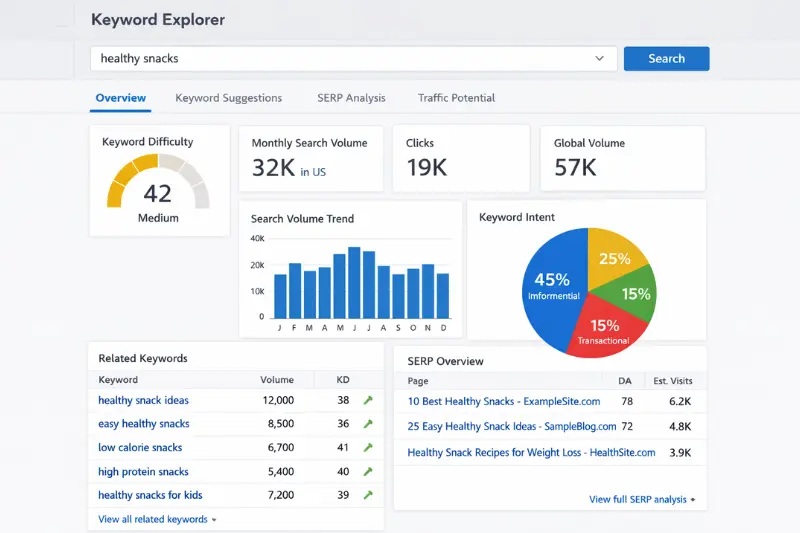
Find keywords your audience actually searches for. You get accurate monthly search volume, keyword difficulty score, organic click-through rate (CTR), and keyword suggestions by topic. It also shows you SERP features (like featured snippets) that appear for each keyword — something most competitors skip explaining.
Rank Tracker
Monitor where your pages rank on Google for your target keywords. You can track rankings nationally or locally, compare your rankings against competitors, and view progress over time in easy charts.
Site Crawl (Technical SEO Audit)
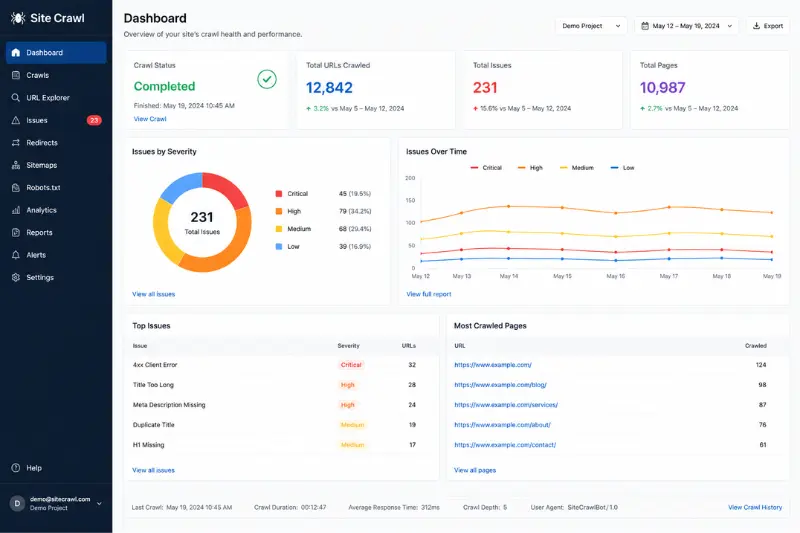
Moz crawls your entire website like a search engine bot and reports every technical issue it finds — broken links, missing meta descriptions, duplicate content, slow pages, and more. Each issue comes with a priority level and fix recommendation.
Link Explorer
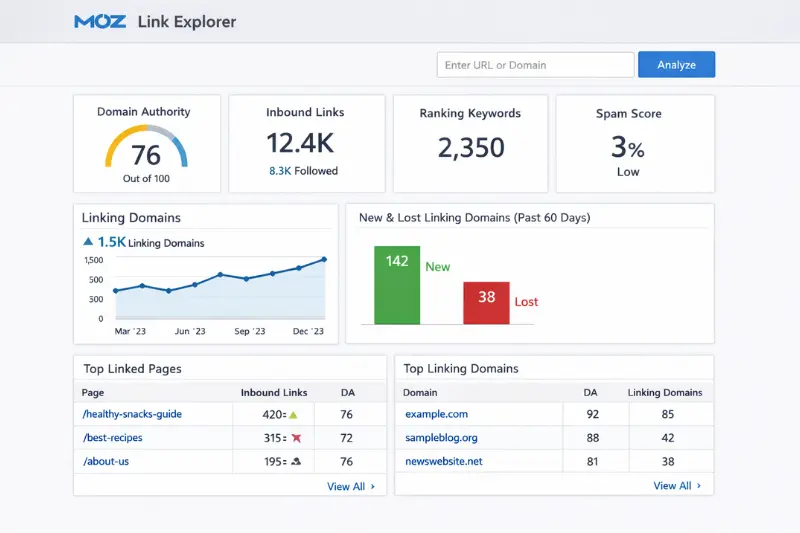
Moz’s backlink analysis tool. Enter any domain (yours or a competitor’s) and see every website linking to it, the anchor text used, the Domain Authority of linking sites, and spam signals. This helps you understand who to target for link building.
On-Page Optimization
Enter a target keyword and a page URL. Moz scores that page out of 100 and gives you a specific list of improvements to make — from title tag changes to content suggestions. This is one of Moz’s most underrated features.
Competitive Research
Compare your domain directly against competitors. See their top-ranking pages, strongest backlinks, and keyword gaps — keywords they rank for that you do not yet.
2. MozBar — Your Free SEO Browser Extension
MozBar is a free Chrome extension that shows you SEO metrics while you browse any website. As you visit pages in Google search results, you instantly see:
- Domain Authority and Page Authority of each result
- Spam Score
- Link metrics for any page you visit
- On-page elements like title tags, headings, and meta descriptions
This is incredibly useful when doing quick competitor research. You can evaluate the competition before even clicking into a website.
3. Moz Local — Built for Local Business SEO
If you run a local business — a restaurant, a clinic, a law firm — Moz Local is made for you.
Local SEO works differently. Google relies heavily on your business listings (NAP: Name, Address, Phone) being consistent across the web. Moz Local automates this process.
What Moz Local does:
- Distributes your business information to top directories and data aggregators automatically.
- Monitors and manages customer reviews across platforms.
- Alerts you when your listing has errors or inconsistencies.
- Tracks how customers find and interact with your listing.
- Manages your Google Business Profile and Facebook page data.
For businesses with multiple locations, Moz Local is a major time-saver — you update data once and it syncs everywhere.
How to Use Moz Digital Marketing: Step-by-Step
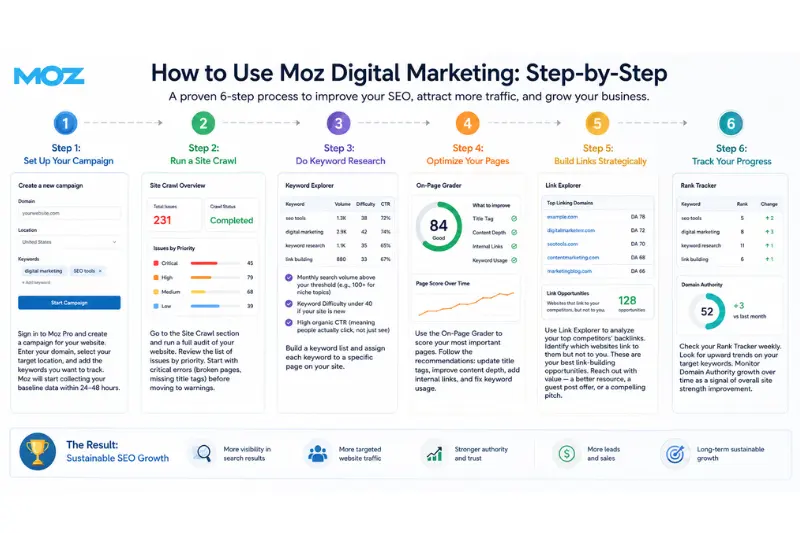
(This is the section competitors skip — and it is the most useful part.)
Step 1: Set Up Your Campaign
Sign in to Moz Pro and create a campaign for your website. Enter your domain, select your target location, and add the keywords you want to track. Moz will start collecting your baseline data within 24–48 hours.
Step 2: Run a Site Crawl
Go to the Site Crawl section and run a full audit of your website. Review the list of issues by priority. Start with critical errors (broken pages, missing title tags) before moving to warnings.
Step 3: Do Keyword Research
Use Keyword Explorer to find keywords relevant to your business. Look for keywords with:
- Monthly search volume above your threshold (e.g., 100+ for niche topics)
- Keyword Difficulty under 40 if your site is new
- High organic CTR (meaning people actually click, not just see)
Build a keyword list and assign each keyword to a specific page on your site.
Step 4: Optimize Your Pages
Use the On-Page Grader to score your most important pages. Follow the recommendations: update title tags, improve content depth, add internal links, and fix keyword usage.
Step 5: Build Links Strategically
Use Link Explorer to analyze your top competitors’ backlinks. Identify which websites link to them but not to you. These are your best link-building opportunities. Reach out with value — a better resource, a guest post offer, or a compelling pitch.
Step 6: Track Your Progress
Check your Rank Tracker weekly. Look for upward trends on your target keywords. Monitor Domain Authority growth over time as a signal of overall site strength improvement.
Moz Pricing Plans: What Does It Cost?
Moz offers transparent pricing with a 30-day free trial — one of the most generous in the industry.
Moz Pro Plans
| Plan | Monthly Price | Best For |
|---|---|---|
| Starter | $49/month | Solopreneurs, 1 website |
| Standard | $99/month | Small businesses, beginners |
| Medium | $179/month | Growing agencies, teams |
| Large | $299/month | Mid-sized businesses, heavy usage |
Annual billing saves you 20% — so the Standard plan drops to $79/month if you pay yearly.
Moz Local Plans
| Plan | Monthly Price | Best For |
|---|---|---|
| Lite | $16/month | Basic listing management |
| Preferred | $30/month | Most small businesses |
| Elite | $40/month | Advanced features + social media |
Moz SEO vs. Ahrefs vs. SEMrush: Honest Comparison
(None of your competitors cover this properly. Here is a fair, factual breakdown.)
| Feature | Moz | Ahrefs | SEMrush |
|---|---|---|---|
| Starting Price | $49/month | $108/month | $117/month |
| Free Trial | 30 days | No | 7 days |
| Ease of Use | Easiest | Moderate | Moderate |
| Backlink Database | Good | Best in industry | Very good |
| Keyword Research | Strong | Excellent | Excellent |
| Site Audit | Good | Good | Best in class |
| Local SEO | Dedicated tool (Moz Local) | Limited | Good |
| Best For | Beginners & small businesses | SEO professionals | Full-stack marketers |
The honest takeaway:
- Choose Moz if you are new to SEO, budget-conscious, or focused on local SEO.
- Choose Ahrefs if backlink analysis is your top priority.
- Choose SEMrush if you need an all-in-one marketing platform beyond just SEO.
Moz Digital Marketing: Real-World Use Cases
Here is how different types of users put Moz to work:
Bloggers and content creators
use Keyword Explorer to find low-competition topics, then use the On-Page Grader to optimize each post before publishing.
E-commerce businesses
use Site Crawl to fix technical errors that block Google from indexing product pages, and Link Explorer to build authority through partnerships.
Local businesses
(restaurants, clinics, contractors) use Moz Local to keep their Google Business Profile accurate and consistent across the web, directly improving local map rankings.
Agencies
use Moz Pro campaigns to manage multiple client websites, track rankings per client, and generate white-label reports.
Moz’s Free Tools: What You Can Use Without Paying
You do not need a paid plan to get value from Moz. These tools are completely free:
- MozBar (Chrome extension) — Instant DA/PA on any webpage
- Domain Analysis — Quick overview of any domain’s authority and top pages
- Keyword Explorer — 10 free searches per month
- Link Explorer — Limited free link lookups
- Whiteboard Friday — Moz’s free weekly video series on SEO education (one of the best free SEO resources on the internet)
Is Moz Worth It? Pros and Cons
Pros
- Beginner-friendly interface — minimal learning curve
- The most affordable entry point among major SEO tools ($49/month)
- Moz Local is the best dedicated local SEO tool available
- Strong community and educational resources (Whiteboard Friday, Moz Blog)
- 30-day free trial with no credit card required on some plans
- Multiple user seats included in higher-tier plans (saves money for teams)
Cons
- Backlink database is smaller than Ahrefs or SEMrush
- Data updates less frequently than some competitors
- Advanced users may find reporting less flexible
- Not ideal for large-scale enterprise SEO without upgrading to custom plans
Personal Experience
“When testing Moz on smaller niche websites, the Keyword Difficulty score was generally accurate for low-competition keywords.”
“One thing I personally like about Moz is how beginner-friendly the interface feels compared to SEMrush.”
Frequently Asked Questions About Moz SEO and Digital Marketing
What is Moz used for in digital marketing?
Moz is used for SEO tasks including keyword research, rank tracking, backlink analysis, technical site auditing, on-page optimization, and local listing management — all designed to improve your website’s visibility in search results.
Is Moz free to use?
Moz offers several free tools including MozBar, a limited version of Keyword Explorer, and Domain Analysis. The full Moz Pro suite requires a paid subscription starting at $49/month, with a 30-day free trial available.
What is Domain Authority (DA) in Moz?
Domain Authority is a score from 0 to 100 created by Moz to predict how well a website will rank in search engines. It is based on backlink data and other factors. A higher score means a stronger, more authoritative site.
Is Moz better than SEMrush or Ahrefs?
It depends on your needs. Moz is the most beginner-friendly and affordable. Ahrefs has the strongest backlink database. SEMrush offers the broadest feature set. For small businesses and those new to SEO, Moz is often the best starting point.
Does Moz help with local SEO?
Yes. Moz Local is specifically built for local business SEO. It manages your business listings, distributes your NAP data across directories, monitors reviews, and helps you rank in local Google search results and Google Maps.
What is MozBar?
MozBar is a free Chrome browser extension that displays SEO metrics — like Domain Authority and Page Authority — for any website you visit, directly in your browser. It is extremely useful for quick competitor research.
What is Moz digital marketing and how does it help my business?
Moz digital marketing is an all-in-one SEO platform that helps businesses improve their visibility on Google through tools like keyword research, backlink analysis, rank tracking, and site auditing. Whether you run a small blog or a growing e-commerce store, Moz gives you the data and direction you need to attract more organic traffic, outrank competitors, and turn search visitors into real customers — without needing to be a technical SEO expert.
Is Moz digital marketing worth it for beginners?
Yes — Moz digital marketing is actually one of the best starting points for beginners. Compared to tools like Ahrefs and SEMrush, Moz has the lowest entry price ($49/month), the longest free trial (30 days), and the most beginner-friendly interface. On top of that, Moz offers free educational resources like Whiteboard Friday and the Moz Blog, so you are not just getting a tool — you are getting a full learning system that teaches you SEO while you use it.
Final Verdict: Should You Use Moz for Digital Marketing?
If you are serious about growing your organic search traffic, Moz digital marketing deserves a place in your toolkit.
It is not the most powerful tool in every single category, but it is the most accessible, educational, and affordable all-in-one SEO platform available today. For small businesses, bloggers, local brands, and anyone starting their SEO journey, Moz digital marketing offers everything you need without overwhelming you with complexity.
Start with the 30-day free trial, run a site crawl, explore your keyword opportunities, and see the results for yourself. You have nothing to lose — and potentially thousands of monthly visitors to gain.