Home Freelancing & Remote JobsData Entry Remote Jobs: Pay, Skills & How to Get Hired

Data Entry Remote Jobs: Pay, Skills & How to Get Hired

by Ethan Bennett

If you’re searching for data entry remote jobs, you’re far from alone. Remote data entry remains one of the most accessible ways to start working from home because it typically doesn’t require a college degree, years of specialized experience, or expensive certifications. For many job seekers, data entry remote jobs provide a practical entry point into the broader remote-work market while offering valuable experience with business software, databases, customer records, and digital workflows.

That said, there’s also a lot of misinformation surrounding data entry remote jobs. Some websites make it sound like anyone can earn hundreds of dollars per day simply by typing from home, while others claim the entire field has disappeared due to automation and artificial intelligence. The reality falls somewhere in between. Legitimate data entry remote jobs absolutely exist, but they require accuracy, attention to detail, basic software skills, and the ability to identify and correct mistakes before they create larger problems.

Today’s data entry roles extend far beyond simply typing information into spreadsheets. Employers often need professionals who can manage databases, process claims, review records for quality issues, update customer information, handle contract data, and even assist with AI training projects. As a result, data entry remote jobs now cover a wide range of specialties with varying pay rates, skill requirements, and career opportunities.

In this guide, you’ll learn what data entry remote jobs actually involve, how much they pay, the skills employers look for, how to avoid scams, and what the future of the industry looks like as AI continues to reshape administrative work. Whether you’re looking for your first remote position or hoping to move into a higher-paying specialty, understanding the realities of data entry remote jobs can help you make smarter career decisions.

What Remote Data Entry Jobs Actually Involve

At its core, data entry means taking information from one place — a paper form, a PDF, a phone call, a scanned document — and accurately recording it into a digital system: a spreadsheet, a CRM, a database, or specialized software. That sounds simple, and the typing part is. The part that actually gets you hired is everything around the typing: catching errors before they become someone else’s problem, following formatting rules exactly, and knowing when something looks wrong enough to flag rather than just enter.

Most job listings labeled “data entry” actually fall into a handful of distinct categories, and knowing which one you’re applying for changes what skills and pay to expect:

  • General data entry clerk/specialist — entering data from documents into spreadsheets or internal systems. The most common and most entry-level category.
  • Claims or billing data entry — processing insurance claims, medical billing codes, or payment records. Usually requires more training and pays more.
  • Contract or legal data entry — abstracting terms from contracts into a management system (e.g., renewal dates, clauses). Often requires 2–4 years of relevant experience and pays the highest hourly rates in the data entry category.
  • Transcription and medical transcription — converting audio or dictation into written text. Closely related to data entry but with its own skill set (listening accuracy, medical terminology).
  • Data quality / data cleansing — reviewing existing records for duplicates, errors, or inconsistencies rather than entering brand-new data.
  • AI training / data annotation — a newer category that’s grown fast. You’re labeling, categorizing, or reviewing text/image/audio data used to train AI models. It pays similarly to traditional data entry but the work looks different: less “type what you see,” more “judge and classify according to detailed guidelines.”
  • If a posting doesn’t tell you which of these you’re actually doing, that’s worth asking about before you apply — the day-to-day experience (and required skills) vary more than the shared job title suggests.

How Much Remote Data Entry Jobs Actually Pay

Pay varies more by specialty and employment type than most “salary guide” articles let on. Here’s a realistic breakdown based on current market rates across employers and staffing agencies:

Role TypeTypical PayNotes
General data entry clerk (entry-level)$15–$20/hourOften temporary or contract-to-hire through staffing agencies
Data entry specialist (some experience)$18–$25/hourMay include CRM/database work, not just spreadsheets
Claims/medical billing data entry$19–$28/hourUsually requires industry knowledge or certification
Contract/legal data entry$30–$45/hourRequires 2+ years experience with specific software (e.g., contract management systems)
Data annotation/AI training$16–$25/hourPay scales with task complexity and domain expertise required
Salaried data entry roles (full-time, benefits)$35,000–$50,000/yearOften titled “specialist” or includes adjacent responsibilities (commissions, accounting support)

A few honest caveats most articles skip: pay-per-task or piece-rate arrangements (common with some “online data entry” gigs) can work out to less than minimum wage if you’re not fast yet, since you’re paid per record rather than per hour. And “remote” doesn’t automatically mean “work whenever you want” — most employer-direct roles still expect you online during set business hours, even if you’re not in an office. Genuinely flexible, asynchronous data entry work exists, but it’s the exception, not the rule, and it tends to pay at the lower end of these ranges.

Skills That Actually Get You Hired

skills that actually get you hired

Typing speed matters, but it’s not the whole picture, and over-indexing on WPM is a common mistake.

Typing speed and accuracy

40 WPM is the realistic floor for most postings; 60+ WPM is competitive for higher-paying roles. But accuracy matters more than speed — most employers care more about 97%+ accuracy at 45 WPM than 99% accuracy… at 95 WPM with frequent errors. If you don’t know your numbers, free typing tests (like those built into typing.com or 10fastfingers) take two minutes and give you both stats.

Software proficiency

Excel or Google Sheets fluency is assumed, not optional — specifically sorting, filtering, basic formulas (VLOOKUP/XLOOKUP, SUMIF), and pivot tables for more senior roles. Beyond spreadsheets, familiarity with at least one CRM (Salesforce, HubSpot) or database tool gives you a real edge, since a lot of “data entry” today means updating records inside business software rather than typing into a blank spreadsheet.

Attention to detail, demonstrated, not claimed

Every posting says “detail-oriented.” What actually proves it in an interview or screening test is your error rate on a sample task, your ability to describe how you double-check your own work, and whether you ask clarifying questions about ambiguous source documents instead of guessing.

Confidentiality awareness

A lot of data entry work touches sensitive information — financial records, medical data, client contact info. Employers are screening for whether you understand data handling basics (not sharing screens carelessly, not saving sensitive files to personal devices, following whatever access controls they specify), especially for healthcare or financial clients.

Communication, even in a “heads-down” role

You’ll need to flag discrepancies, ask for clarification on unclear source material, and sometimes coordinate with a small team. Roles that look purely solitary on paper almost always involve some daily written communication — Slack updates, ticket notes, or email check-ins.

What You Actually Need to Work From Home

This part gets glossed over, but it affects whether you can even apply:

  • A reliable, wired internet connection is preferred by most employers over Wi-Fi, especially for roles touching sensitive data — some will explicitly require it.
  • A dedicated, distraction-free workspace. Several employers conduct video check-ins or require webcam-on training, so “working from the couch” isn’t realistic for most direct-hire roles.
  • A current computer, not necessarily a powerful one — data entry doesn’t need serious processing power, but it does need a system that can run Excel, your browser, and your employer’s software without lagging.
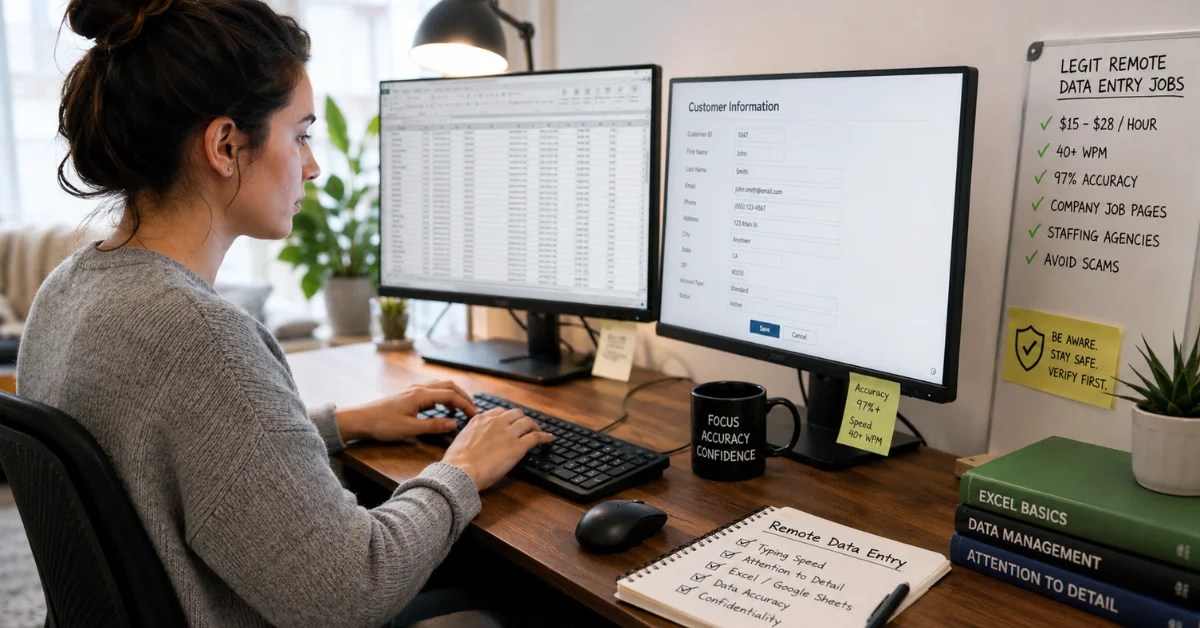
  • Two monitors, if you can manage it. This isn’t required, but if you’re doing high-volume data entry from source documents, having the source on one screen and the entry field on the other measurably speeds you up and reduces errors. Worth the investment if you’re doing this long-term.
  • Ergonomic setup. Data entry is repetitive-motion work. An external keyboard and mouse, a chair that supports your back, and a monitor at eye height aren’t luxuries here — they’re what stands between you and wrist or neck pain six months in. This rarely gets mentioned in job-hunting guides, but anyone who’s done high-volume data entry for a living will tell you it matters.

W2 Employee vs. 1099 Contractor: Know the Difference Before You Apply

w2 employee vs. 1099 contractor know the difference before you apply

This distinction changes your taxes, your benefits, and your job security, and a lot of postings don’t make it obvious upfront.

W2 employee roles

(common with staffing agencies and direct-hire employers) mean taxes are withheld automatically, you may be eligible for benefits (health insurance, PTO) especially in full-time roles, and you’re generally protected by standard employment law. Pay is usually quoted hourly or as an annual salary.

1099 contractor roles

(common with smaller companies and some “remote-first” data entry platforms) mean you’re responsible for your own tax withholding (set aside roughly 25–30% of your pay for self-employment and income tax), you don’t get employer-provided benefits, and you have more flexibility but less security. Contract roles often pay a slightly higher nominal hourly rate to offset the lack of benefits — but if you don’t account for self-employment tax, that “higher” rate can end up being a wash or worse.

Always ask directly: “Is this a W2 or 1099 position?” before accepting an offer. It’s a normal question, not a red flag to ask it.

How to Spot a Data Entry Job Scam (Read This Before You Apply Anywhere)

This is the part most “remote data entry job” guides either skip entirely or mention in one throwaway sentence — and it’s arguably the most useful thing you can know going in, because data entry is one of the most heavily scammed job categories online.

Red flags that should stop you immediately:

  • They ask you to pay for anything upfront — a “starter kit,” software license, background check fee, or equipment, especially before you’ve even had an interview. Legitimate employers don’t charge employees to start working.
  • You’re offered the job without any real interview. A quick chat or a single email exchange with no discussion of your actual skills or experience is a major warning sign.
  • They send you a check and ask you to send part of it back (often framed as “for equipment” or “to a vendor”). This is a classic overpayment scam — the check will eventually bounce, and you’ll be liable for the money you sent.
  • The pay sounds too good for the skill level required. $35–$50/hour for basic typing with no experience required isn’t realistic; if you see it, assume it’s a scam until proven otherwise.
  • Communication only happens over text or chat apps, never a verifiable company email address or phone call.
  • The “company” has no verifiable online presence — no real website, no LinkedIn presence for the people supposedly hiring you, no reviews anywhere.
  • They ask for sensitive personal information very early — your Social Security number or bank details before you’ve signed any actual offer or onboarding paperwork.

How to verify a posting is legitimate before you apply:

  1. Search the exact company name plus “scam” or “reviews” — a few minutes of searching saves a lot of grief.
  2. Check whether the company has a real, findable website with content beyond the job posting itself.
  3. Look up the person who contacted you on LinkedIn — do they have a real history at this company?
  4. If it’s a staffing agency, confirm they’re listed with the Better Business Bureau or a similar accreditation body.
  5. Trust the instinct that something feels off. Scam postings are often well-written, but the offer itself rarely survives basic scrutiny.

Most employers genuinely hiring for remote data entry roles are also aware of how scam-heavy this space is — many post explicit anti-scam notices on their own career pages for exactly this reason. That’s not a red flag about the employer; it’s a sign they’re trying to protect applicants.

How to Actually Get Hired

1 Tailor your resume to the specific data entry type

A resume aimed at “general data entry clerk” roles and one aimed at “contract data entry specialist” roles should not look the same — lead with the software and domain experience relevant to that specific posting (Excel formulas for general roles, contract management systems for legal data entry, EHR/billing systems for healthcare).

2 Quantify your accuracy and speed wherever you can

“Entered and verified 200+ records daily with 99% accuracy” tells a hiring manager far more than “responsible for data entry tasks.”

3 Practice the kind of skills test you’ll likely face

Many employers use a timed typing and accuracy test, or a short sample task (transcribing a document, entering sample records into a spreadsheet) as part of screening. Doing a few practice runs beforehand — and timing yourself — removes most of the nerves.

4 Ask about the tools before you accept

What software will you use day to day? Is training provided, or are you expected to already know it? This single question often reveals more about how organized (or disorganized) the employer is than anything else in the interview.

5 Apply through multiple channels at once

not just one job board. Company career pages, staffing agencies (which often have data entry roles not posted publicly), and curated remote job boards each surface different openings — relying on a single source meaningfully limits what you’ll see.

Where Remote Data Entry Is Headed: The AI Factor

where remote data entry is headed the aI factor

It would be dishonest to write a guide to remote data entry without addressing this directly: AI tools are absolutely changing this field, and pretending otherwise does readers a disservice.

The most repetitive, structured forms of data entry — fixed-format documents with predictable fields — are increasingly handled by OCR and automated extraction tools, reducing demand for the most basic version of this work. At the same time, two things are growing in parallel: human review and quality-assurance roles (someone still has to catch what the automation gets wrong, especially with messy or non-standard documents), and AI training and data annotation roles, where humans label and structure data specifically to make AI systems more accurate. Functionally, this is still data entry-adjacent work — detail-oriented, instruction-driven, screen-based — but it’s worth understanding it’s a related field, not a guaranteed long-term substitute for traditional typing-heavy roles.

The practical takeaway: if you’re building a career around this kind of work rather than treating it as a short-term gig, it’s worth developing adjacent skills — basic data analysis, CRM administration, or QA processes — that let you move up rather than staying in the most automatable layer of the job.

Frequently Asked Questions

1. Are data entry remote jobs legitimate?

Yes, legitimate data entry remote jobs exist and are offered by healthcare companies, insurance providers, legal firms, financial institutions, staffing agencies, retailers, and technology companies. However, because scammers frequently target this category, it’s important to verify every opportunity before applying.

2. How much do data entry remote jobs pay?

Most entry-level data entry remote jobs pay between $15 and $20 per hour, while experienced specialists may earn $20 to $30+ per hour. Specialized roles such as legal contract data entry or medical billing data entry can sometimes pay $30 to $45 per hour.

3. Do I need experience for data entry remote jobs?

Not always. Many entry-level data entry remote jobs are designed for candidates with little or no prior experience. However, having strong typing skills, spreadsheet knowledge, and attention to detail can significantly improve your chances of getting hired.

4. What typing speed is required for data entry remote jobs?

Most employers hiring for data entry remote jobs prefer candidates who can type at least 40 words per minute with high accuracy. Competitive applicants often type 60 words per minute or faster while maintaining an accuracy rate above 97%.

5. Are data entry remote jobs full-time or part-time?

Both options exist. Some data entry remote jobs are full-time positions with benefits, while others are part-time, temporary, project-based, or freelance contract opportunities. The schedule depends on the employer and the nature of the work.

6. What equipment do I need for data entry remote jobs?

For most data entry remote jobs, you’ll need a reliable computer, high-speed internet connection, updated web browser, and basic office software. Many professionals also use dual monitors and ergonomic equipment to improve productivity and comfort.

7. Can I work flexible hours in data entry remote jobs?

Some data entry remote jobs offer flexible schedules, especially freelance and contract positions. However, many employer-based roles still require workers to be available during standard business hours for communication and collaboration.

8. Which industries hire the most people for data entry remote jobs?

Healthcare, insurance, legal services, finance, real estate, retail, e-commerce, and technology companies are among the biggest employers offering data entry remote jobs. AI data annotation and data-quality roles have also grown significantly in recent years.

9. Are data entry remote jobs being replaced by AI?

Automation is changing some aspects of data entry remote jobs, particularly repetitive document processing. However, employers still need people to verify information, review errors, handle exceptions, maintain data quality, and perform AI training tasks that require human judgment.

10. How can I avoid scams when applying for data entry remote jobs?

The safest approach is to apply through company career pages, reputable staffing agencies, and trusted job boards. Avoid any data entry remote jobs that require upfront payments, promise unrealistic earnings, skip interviews, or request sensitive personal information too early in the hiring process.

Final Thoughts

Data entry remote jobs continue to offer one of the most accessible paths into remote work. While the role has evolved beyond simple typing, the core skills employers value remain the same: accuracy, attention to detail, reliability, software proficiency, and the ability to follow instructions consistently. For job seekers without advanced technical backgrounds, data entry remote jobs can provide valuable work-from-home experience while creating opportunities to develop transferable skills that lead to higher-paying positions in operations, quality assurance, customer support, database management, and data analysis.

At the same time, success in data entry remote jobs requires realistic expectations. The highest-paying opportunities typically demand specialized knowledge, stronger software skills, or industry experience. Likewise, understanding common scams, knowing where to search, and recognizing legitimate hiring practices can save you time and frustration during your job hunt.

Although automation and AI are changing the industry, they are also creating new opportunities in data quality, human review, and AI training. The most successful professionals won’t simply rely on basic typing skills—they’ll continue building complementary skills that allow them to grow alongside changing technology. If you approach data entry remote jobs with the right expectations and a commitment to learning, they can serve as both a reliable source of income and a strong foundation for long-term remote career growth.

You may also like